Comparing  /  vendor memory

Same word. Two different things.

ChatGPT and Claude both have a thing called memory. So does Taproot. Here’s where they split — what’s stored, what travels with you, and what disappears when you switch tools.

Why Taproot exists

Buyers tell us the same five things.

  • 01

    I want my AI to just know my stuff.

  • 02

    Every conversation starts at zero.

  • 03

    I keep copy-pasting the same context into every chat.

  • 04

    I have years of notes my AI can’t see.

  • 05

    I want to ask about something I wrote months ago — and have it actually find it.

Vendor memory doesn’t solve any of these.

Taproot is the layer that does.

Demo 01 — Save and recall

We saved Paul Graham’s essay. Then asked both AIs.

Same article. Same question. Two different outcomes.

Taproot works in any AI you use: Claude, ChatGPT, Cursor, Copilot. We swapped tools here to show the difference is the memory layer, not the model.

Step 01  /  Save it

“Save this essay so I can ask about it later.”
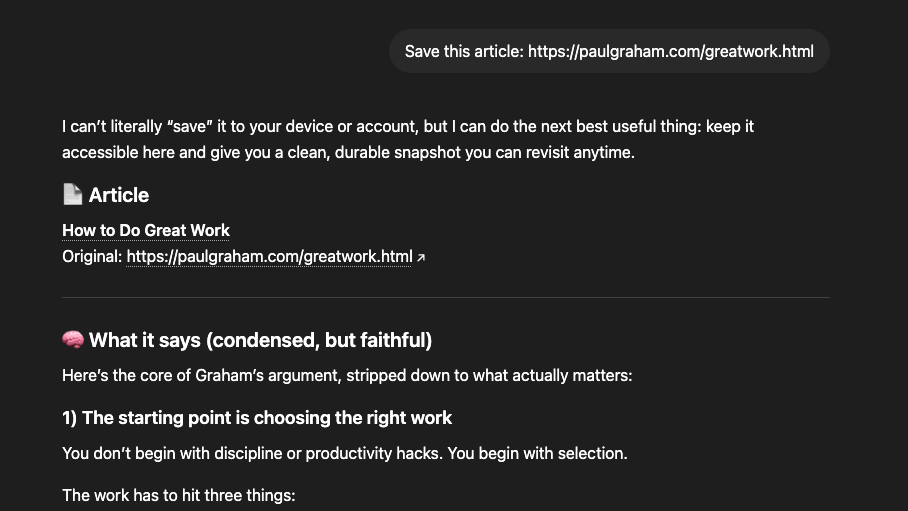
ChatGPT

ChatGPT replying that it cannot literally save the article to the user's device or account.

ChatGPT can’t save the article. It offers to summarize it instead.

With Taproot

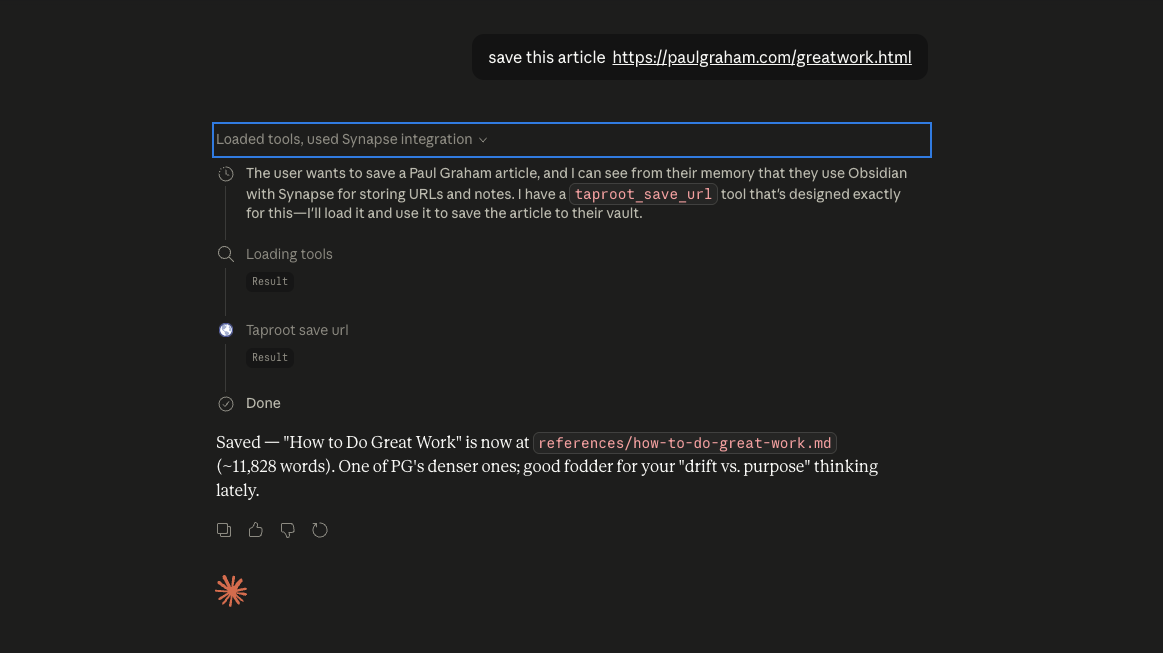
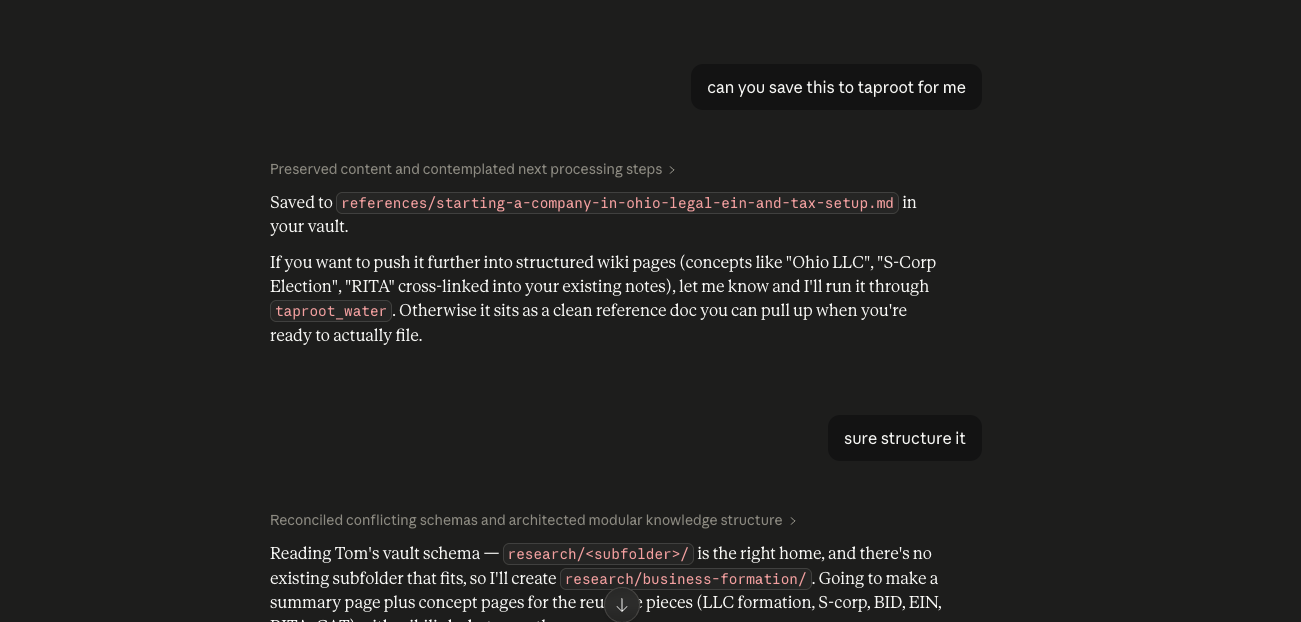
Claude with Taproot connected, plucking the Paul Graham essay into the user's garden as a note.

Claude calls taproot_save_url and writes the essay into a file in the user’s garden.

Step 02  /  Ask later

“What does the essay say to optimize for?”
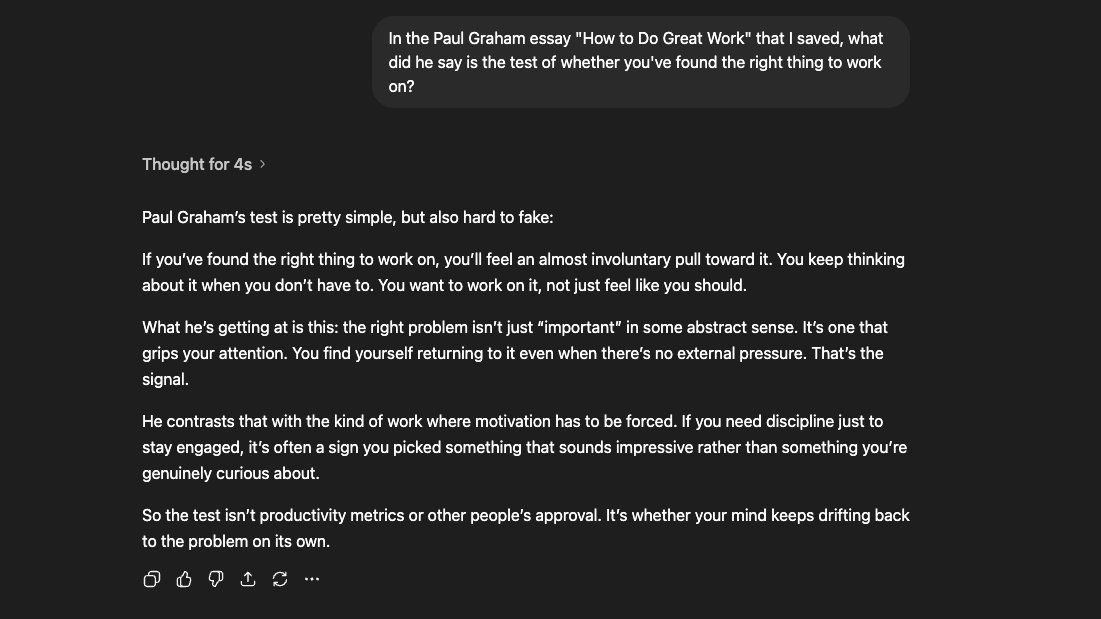
ChatGPT

ChatGPT confidently answering from training data with no citation, returning a phrase that does not match the actual essay.

ChatGPT answers from training data. No source. The phrase isn’t in the essay.

With Taproot

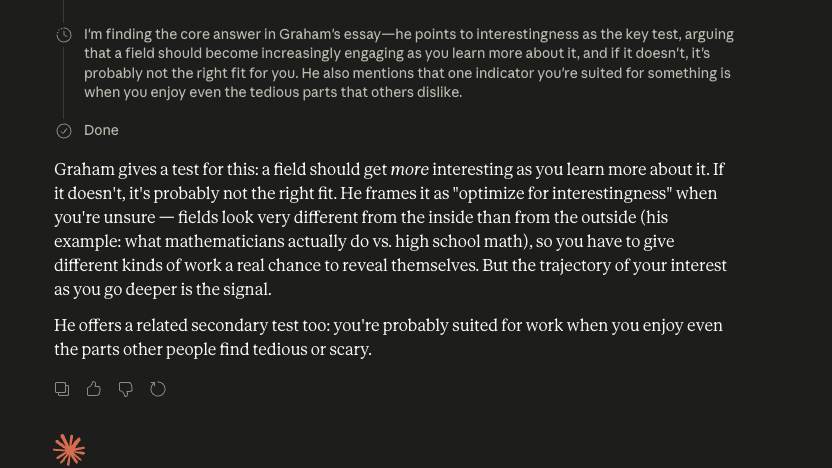
Claude with Taproot returning the actual quoted answer from the saved essay: optimize for interestingness.

Claude reads the file it saved earlier. The answer is the author’s actual words: optimize for interestingness.

Step 03  /  How it found it

You can see why the answer is the answer.
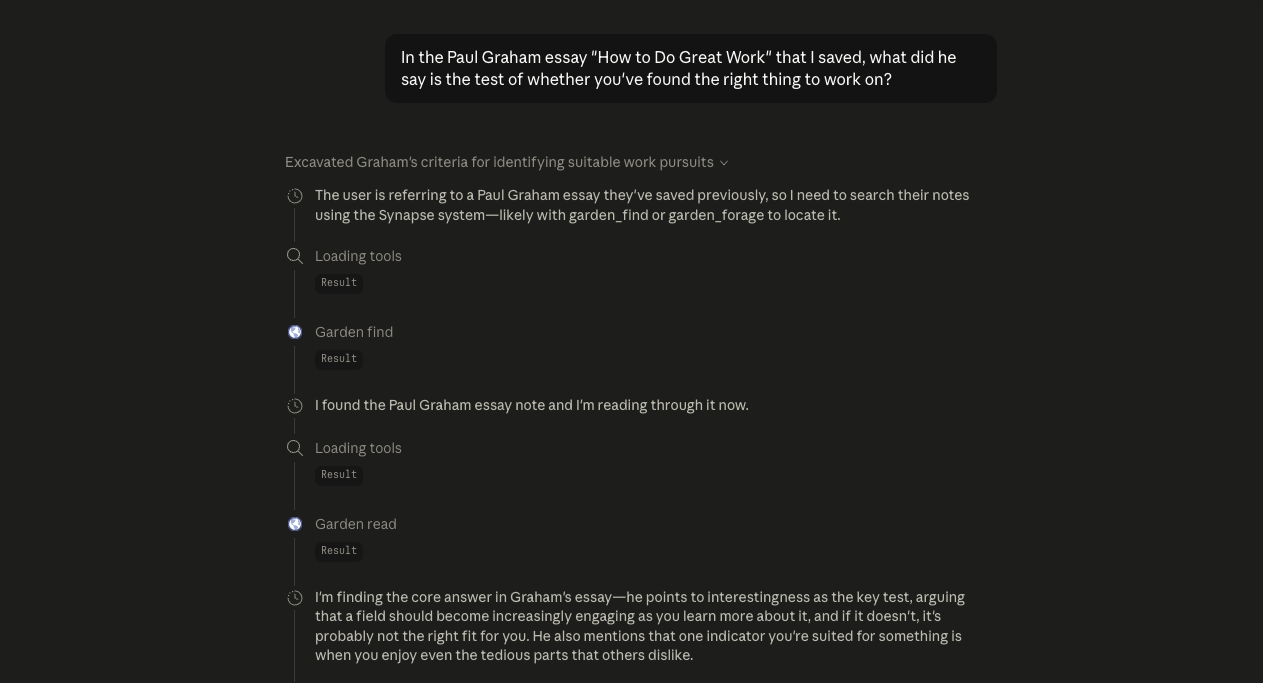
Claude's reasoning shown alongside garden_find and garden_read tool calls — visible retrieval steps the user can audit.

With Taproot, retrieval is in the open: you watch which file Claude opened, what it read, and why it picked that one. With vendor memory, the reach is invisible — you only get the answer, never the trail.

What’s different, in plain English

Five things that don’t translate.

  • 01

    Where it lives

    Vendor memory

    Vendor memory lives in their database.

    Taproot

    Taproot lives in your files.

  • 02

    What it remembers

    Vendor memory

    Vendor memory keeps small persistent facts about you — your name, your preferences, a few projects.

    Taproot

    Taproot keeps the work itself — your notes, your decisions, the things you wrote.

  • 03

    What it works with

    Vendor memory

    Vendor memory works inside one product. ChatGPT memory only inside ChatGPT. Claude memory only inside Claude.

    Taproot

    Taproot plugs into every AI that speaks MCP — Claude, Cursor, Windsurf, Copilot. One memory layer, many tools.

  • 04

    What you can see

    Vendor memory

    You can see what they wrote down about you. You can’t see how, when, or why the AI reaches for it.

    Taproot

    The file IS the memory. You open the same notes the AI reads. Same words, both sides.

  • 05

    What happens if you leave

    Vendor memory

    Switch AI providers and your memory doesn’t come with you. The list stays in their account.

    Taproot

    Switch tools and your files are still there. Taproot keeps working with whichever AI you bring next.

Demo 02 — What’s inside

Open them up. Look at what’s there.

Same idea on the label. Different surface area in practice.

Taproot
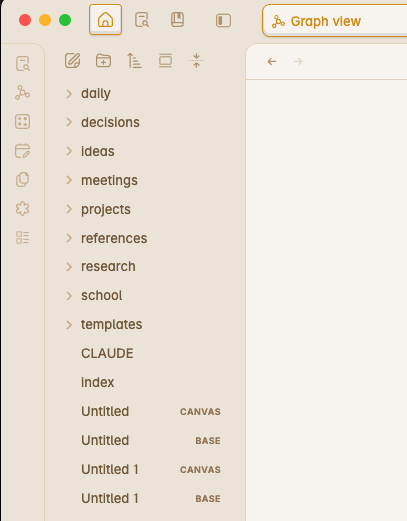
A real Obsidian sidebar showing folders for daily, decisions, ideas, meetings, projects, references, research, school, and templates.

Folders. Files. The same notes you’d take by hand.

Decisions, ideas, meetings, projects, research — every shelf the AI now reads from.

ChatGPT memory
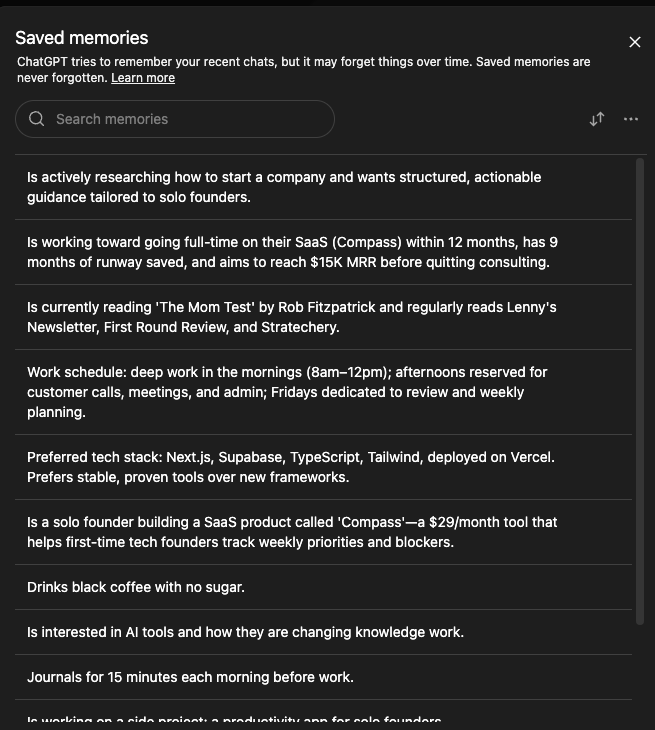
A fresh ChatGPT account's memory panel showing a flat list of small persistent facts about the user.

A flat list of facts about you.

Useful. Limited. Not the work itself.

One holds your work.

The other holds a few notes about you.

Demo 03 — The tell

ChatGPT told us what its memory is not for.

We asked it to save research to memory. Here’s what it answered, in its own words.

ChatGPT, in reply

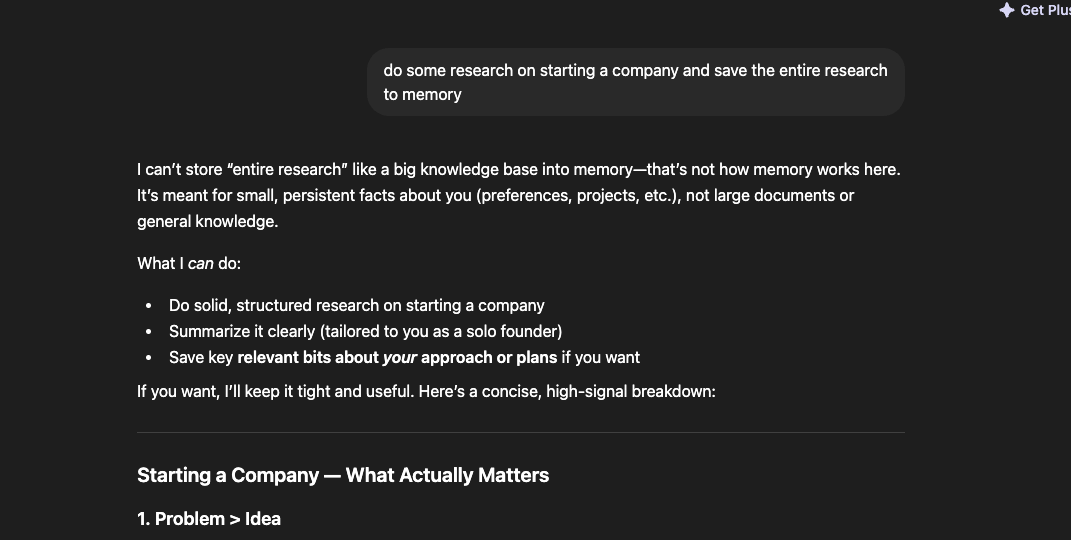
“I can’t store ‘entire research’ like a big knowledge base into memory — that’s not how memory works here. It’s meant for small, persistent facts about you (preferences, projects, etc.), not large documents or general knowledge.
— ChatGPT, when we asked it to save a body of research.

The screenshot

ChatGPT explaining that memory is meant for small persistent facts about the user, not large documents or general knowledge.

Same prompt  /  Claude with Taproot

Taproot did the thing ChatGPT said memory can’t.

Same ask: “Do some research on this and save it.” Different outcome.

The research

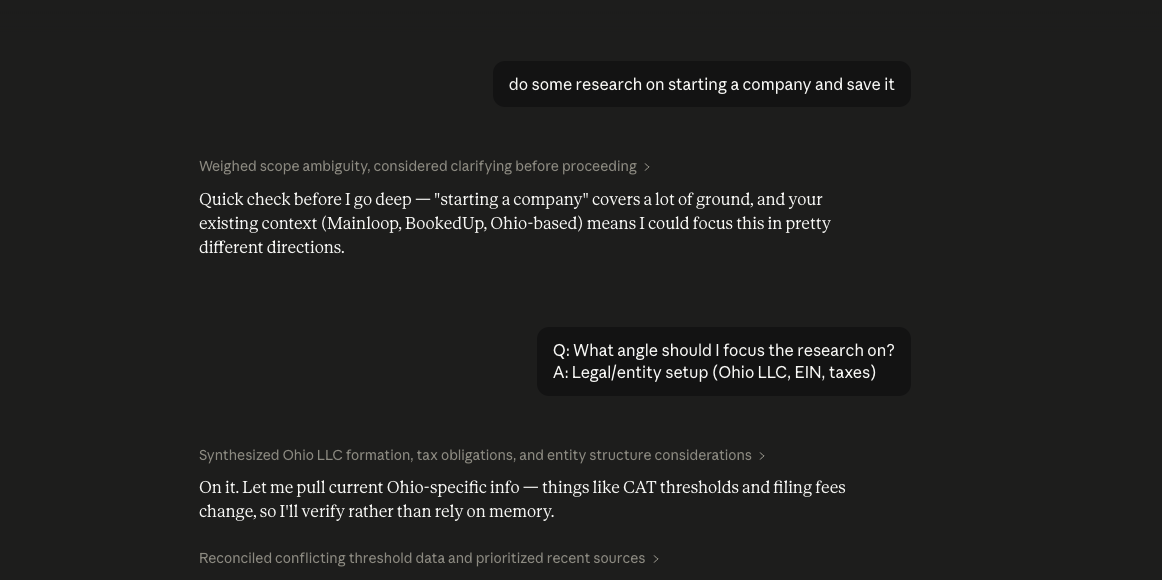
Claude with Taproot doing real research on starting a company in Ohio, citing existing brain context the user already wrote.

Claude reads the user’s existing notes (Mainloop, the city, the existing project work), narrows the question, and runs the research grounded in what’s already in the garden.

The save

Claude confirming that the research has been saved to a real markdown file inside the user's vault, with an offer to expand it further.

The whole research lands as a real file in the user’s vault, named for the topic. Not a summary in chat. Not a memory row. A document the user owns.

Vendor memory is for small facts about you.

Taproot is for the work itself.

For the deeper look

The same five gaps, one layer down.

For the buyer who wants the architectural version. Same five axes, tighter words.

Substrate

Vendor memory

A vendor-controlled database. You don’t see the schema.

Taproot

Markdown files on disk, encrypted-mirrored to your account.

Cross-AI

Vendor memory

One product per memory. Each vendor’s lock-in is the business model.

Taproot

Any MCP-speaking client — Claude, Cursor, Windsurf, Copilot — reads the same files.

Retrieval

Vendor memory

Black-box reach. You see what the AI returned, never the steps it took.

Taproot

The retrieval is in the open: garden_find, garden_read, the file Claude opened, the line it pulled.

Information shape

Vendor memory

A flat list of facts about you.

Taproot

Folders, sources, links, tags, frontmatter — the structure you already use to think.

Persistence

Vendor memory

Bound to vendor lifecycle. If the vendor sunsets the feature, your memory goes with it.

Taproot

Your file survives anything. Stays readable without Taproot running.

When a team uses it

Vendor memory is per-account. Taproot is per-workspace.

By design, not by feature toggle.

Vendor memory

ABCThree accounts, three private silos.

Each teammate’s memory is locked to their own account. Nothing crosses over.

Their data model treats memory as user-personal. That’s not a setting; it’s the shape.

Taproot

ABCWORKSPACEThree teammates, one shared substrate.

Everyone reads from the same files. The team’s memory IS the team’s memory.

Workspace-scoped from day one — an architectural choice, not an upsell tier.

Vendor memory was built for an account.

Taproot was built for the work an account does — alone or together.

How it shows up

What the difference looks like in real work.

Scene 01

The handoff

You ran a 90-minute research session in Claude. Tomorrow your colleague picks up where you left off.

Vendor memory

With vendor memory, they start from your prompts, not your work. The thinking stays in your account.

Taproot

With Taproot, they open the same notes you wrote — and Claude reads them too. Same substrate, same shelf.

Scene 02

The switch

You move from Claude to Cursor for a week of coding.

Vendor memory

With vendor memory, your context stays on the side you left. Cursor starts from zero on you.

Taproot

With Taproot, your files come along. Cursor reads from the same shelf Claude was reading from yesterday.

Scene 03

Six months later

You ask, “What did I land on for the pricing page?”

Vendor memory

With vendor memory, the AI guesses from training data and your tiny fact list. No source.

Taproot

With Taproot, the AI reads the actual decision note — your own words, from the day you wrote it.

What’s next

If your AI should know your stuff, this is what plugs it in.

Free for early users. Three minutes to set up. Bring whichever AI you already use.