The root beneath
the work.

Stop re-explaining your work to your AI. A memory layer ChatGPT, Claude, and any AI you use can read from. Captured, kept current, owned by you.

Imagine the last time you used ChatGPT or Claude to work on something. You had to re-explain everything from the top.

Now imagine you didn’t have to.

In plain English

A memory for the AI you already use.

Everything you’ve written.

Everything you’ve decided.

Everything you’ve learned.

You open Claude, ChatGPT, or whatever AI you use.

Recall

What were the top options we narrowed down to?

Without Taproot

Your AI remembers this chat. But not the spreadsheet, the saved articles, or the tradeoffs you weighed last week. You’d dig them up, or accept a guess.

With Taproot

Your AI reaches into your research notes. The shortlist you actually built. Already there, already sorted.

Resume

Where did we leave off in the research?

Without Taproot

Yesterday’s deep-dive lives in a closed tab. Your AI has no memory of it. You’d scroll the old chat, or start over.

With Taproot

Your AI reads yesterday’s session. What you’ve already covered, what’s still open. Picks up exactly there.

What happens when you save something

Save anything. Find it later.

  • 01

    A voice memo on the way home.

  • 02

    A chat thread you want to keep.

  • 03

    A half-thought you typed at 1am.

Taproot transcribes, organizes, tags, and links each one into your notes. Automatically, in the right place, threaded with what you’ve already written.

How is this different from ChatGPT or Claude memory?

Same word. Two different things.

  • 01

    Vendor memory remembers small facts about you. Taproot remembers the work.

  • 02

    Vendor memory is locked to one product. Taproot plugs into every AI you use.

  • 03

    Vendor memory disappears when you switch tools. Your files stay where you put them.

The Problem

Your AI forgets. You become the memory.

The tools don’t talk, the knowledge scatters, and every session ends at zero.

Portability

Every tool starts you at zero.
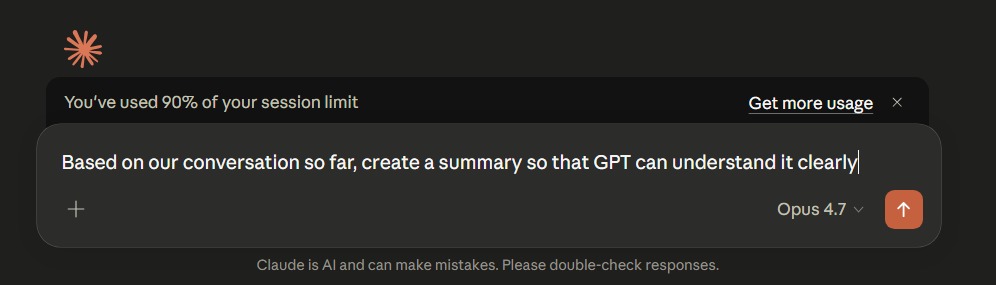
You carry the context between Claude, ChatGPT, Gemini, Cursor. Every session, from scratch. Every teammate doing the same — in parallel, with different context.

Claude session limit warning with user typing a prompt to summarize the conversation so it can be pasted into ChatGPT

Retrieval

You wrote it down. You just can’t find it.

One fact across a dozen tools — Notion, Google Drive, SharePoint, Slack, Claude, email, Voice Memos. Finding it takes twenty minutes and a guess. On a team, the search spans everyone’s.

Loss

When it’s gone, it’s gone.

A Claude session ends. A teammate leaves. Past-you from six months ago. Nothing catches any of it.

More notes won’t fix this.

A layer beneath them will.

The Data Layer

Everything you do runs on something.

The work you ship.The calls you take.The decisions you make.The context you rely on.The ideas you have.

the root

Taproot sits below all of it.

Captured as you work. Structured. Connected. Searchable. Kept current. Owned by you.

Your AI is only as smart as what it knows about you.

It should know whatever you need it to.

Examples: Documentation, Research, Ideas, Decisions, Projects, Client history, Proposals, Playbooks, Pricing logic, Brand voice, Meeting notes
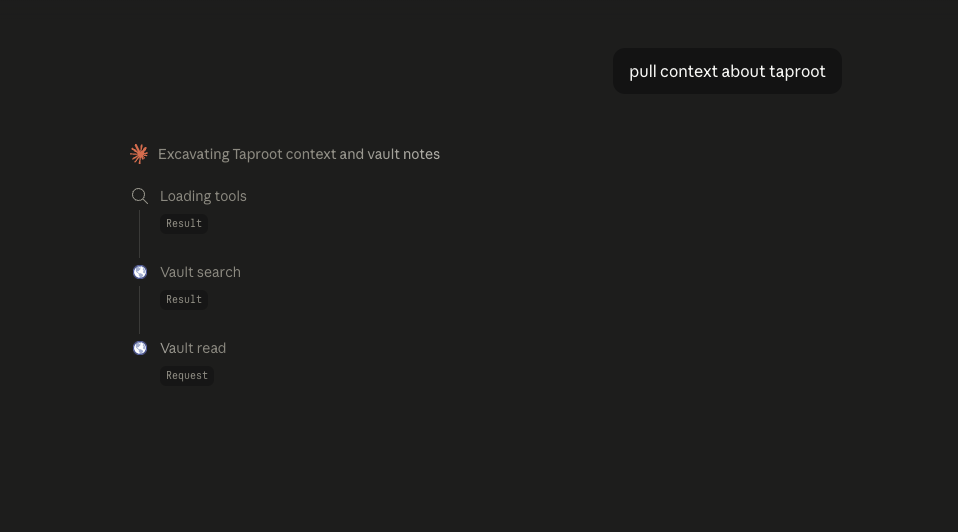
Claude pulling context from the Taproot vault — vault search and vault read tool calls synthesize relevant files into a response

Apps come and go. Your work goes with you.

Over time

Your memory has shape. It compounds.

Notes connect to notes. Decisions connect to past decisions. Your AI reads the threads between them — not just the words.

How It Works

Plugs into the AI you already use.

Whichever AI you or your team opens, Taproot is already in the conversation. No new tab. No new login.

Plugs in

Your team keeps the tools they already know. Every answer comes rooted in your own work, with your AI’s intelligence on top.

Claude
ChatGPT
Gemini
Copilot
NotebookLM
Cursor
Windsurf

Plus most other AI tools you use.

Inside

Eighteen tools. Two roots.

What Taproot actually does for you. Read, plant, forage, harvest — the verbs of a working knowledge layer.

vault ops — 8 tools

Read.

garden_read

open a known note

Plant.

garden_plant

write or overwrite a note

Find.

garden_find

ranked title or topic match

Forage.

garden_forage

phrase search inside notes

Recall.

garden_recent

what you touched recently

Survey.

garden_survey

list a folder

Tag.

garden_tag

peek at note metadata

Measure.

garden_measure

vault counts at a glance

Start your trial

Plant the root once. Keep growing on it.

Every decision, idea, and playbook — captured, kept current, and owned by you. A memory layer that lives in your files, not someone else’s cloud.

Mac-only for now  ·  30 days free  ·  $12/mo after